Pokko

Pokko for Mac

Your Mac finally remembers for you.

One place for everything you would otherwise lose: drop it, paste it or say it. Pokko keeps it, sorts it, and hands it back when you ask.

macOS 14 or later. In private testing; not yet available to download.

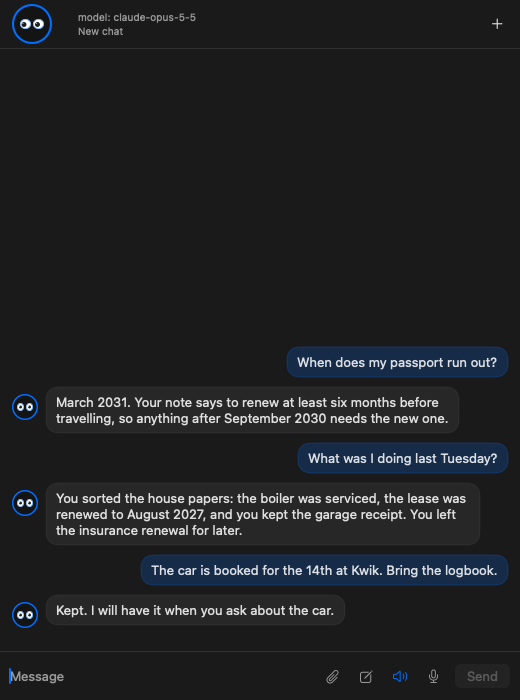
The chat panel on the Mac

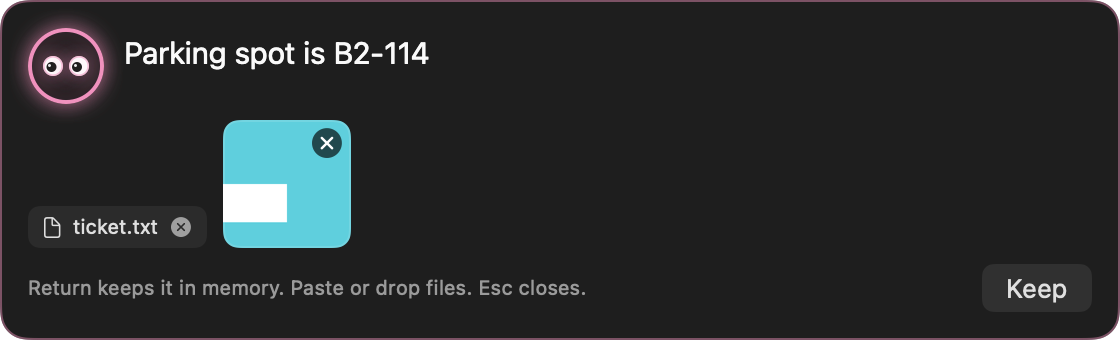
The capture bar

⌥⇧Space, anywhere. Type a thought, paste or drop a file, press Return. Kept, and not sent to an AI.

The capture bar

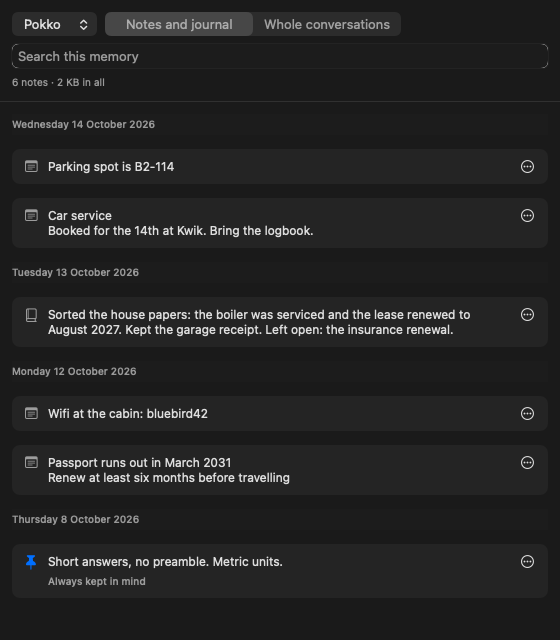
The memory window

Everything by day. Search, edit, pin and delete. Switch between notes and whole conversations. One line says how much is kept and the room it takes.

The memory window

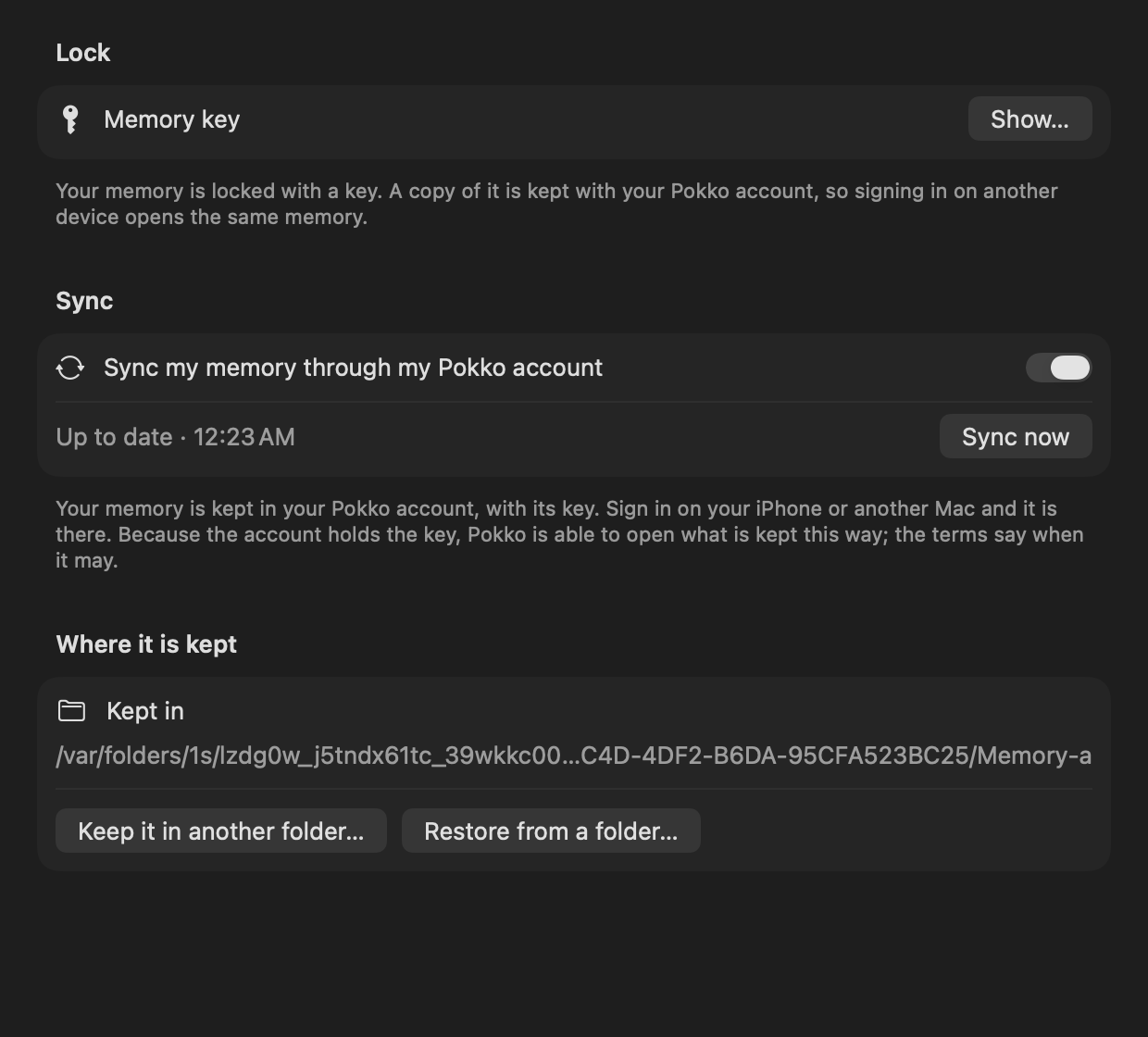
Sync through your account

Signed in, your memory is kept in your Pokko account with its key. Your iPhone or another Mac signs in and has it.

Memory settings: the memory key and sync through the Pokko account

Everything it does

The whole list.

Memory

Capture barPress ⌥⇧Space anywhere: a small bar opens over what you are doing. Type a thought, paste or drop a file, press Return.
Remembers what matters, unaskedSay something lasting (a name, a date, a preference, a plan) and it is kept. No "save this?" question.
Keeps documentsPaste or drop an ID, a contract, a receipt: the file is kept with a note about what it is.
Finds by what a picture saysThe writing in a photo or scan is read on the Mac. "What's my passport number?" finds the scan.
Recall without askingEach message is checked against memory first; what is relevant goes along silently.
Always-in-mind factsWhat should shape every reply (what to call you, how you like answers) is pinned and always present.
A daily journal, written for youEach day's conversation becomes a short entry: what you worked on, what was decided, what is left open.
Every word keptThe full conversation of each day is also kept, word for word, with times.
A day ends at four in the morningWhat you say at one in the morning belongs to the evening before.
"What was I doing last Tuesday?"Ask about a day or a topic; it finds the journal entry and the exact passage.
One conversation with your iPhoneWhat you ask on the phone appears on the Mac, and the other way round.
Efficient with spacePictures are compressed for keeping; the same file kept twice is stored once.

Privacy and ownership

Encrypted memoryEvery note and file is locked (AES-256) before it is written to the memory folder.
Kept in your accountThe memory and its key are kept in your Pokko account, so another device that signs in has them. Pokko is therefore able to open a memory; the terms say when it may.
Daily backupsA copy of the memory is made every day on your Mac and a week of them kept.
Never silently emptyIf the memory's folder goes missing the app says so and offers to restore it.
Private itemsAn ID, a bank card or anything you mark is kept from the AI. It is told the item's name and nothing else.
Private by itselfA passport, an identity card or a bank card is recognised on your Mac, before anything is sent.
Asked every timeWhen the assistant needs what a private item holds, it asks: send this once, or just show me. There is no "always".
Separate memoriesOne assistant can never read another's memory.
Asks before it actsAnything that changes or sends something waits for your OK, in plain words.
Guard against planted instructionsAfter reading a web page, a file or a connected service, saving and sending always ask first.
A separate space per accountSign in as someone else on the same Mac and you see only your own memory, chats and settings.

Voice

Hold to talkHold ⌥Space, speak, release to send.
Replies read aloudA natural-sounding voice (an optional download, about 130 MB) or the Mac's own voice.
On-device listeningApple's built-in recognition, or Whisper running on your Mac.
Says names your wayTell it once how a name is said, and both voices say it that way for good.
Answer by voiceWhen it asks for permission, say yes, no, or what to change.

Files and pictures

Paste, drop or attachImages, PDFs and text files go with a message. Up to four images and four files.
It reads themImages are seen by the model; PDFs are read whole or as text.
Shows files in repliesA file it mentions appears as something to click and see large.

Assistants and the app

Several PokkosEach with its own name, colour and memory.
Several chats at onceOne can be answering while you talk to another.
Choice of AIClaude and Claude Code on your own plan, Ollama on your own Mac, or any OpenAI-compatible service.
Menu bar panelA floating panel that opens on a shortcut and does not take over your screen.
OrbA small presence on screen when the panel is hidden. Push it part of the way off an edge and it peeks.
SmallThe app is about 30 MB. The natural voice and Whisper are optional downloads.
Start overOne button erases what the app keeps on the Mac for your account, after Touch ID or your password.