Pokko

For Mac and iPhone

Drop it. Say it. Pokko keeps it sorted.

The receipt, the passport scan, the cabin wifi, the thing you will have forgotten by Friday. Hand it to Pokko and stop filing. Then just ask.

Both apps are in private testing. Neither is in a store yet.

Pokko on the Mac answering a question about a passport from memory
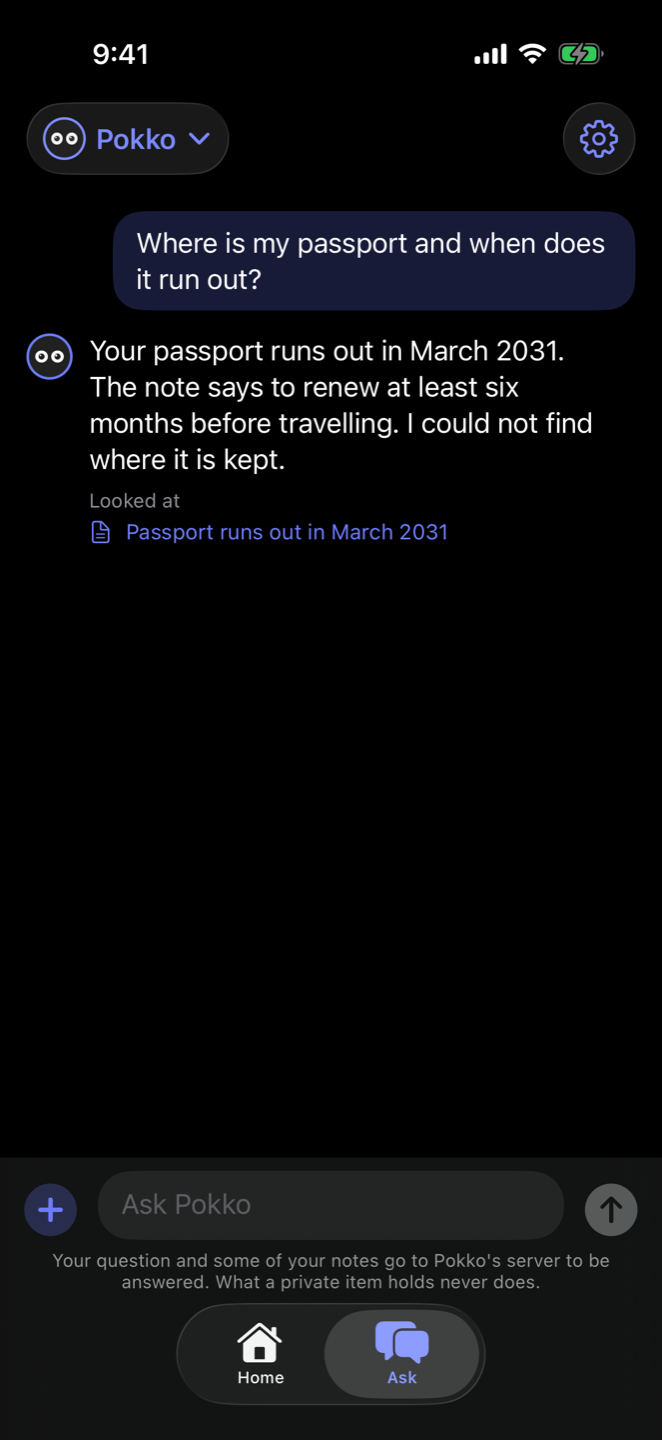
Pokko on the iPhone answering the same question

Try it

Give Pokko anything. Watch the tree grow.

No folders. No tags. No "where did I save that". Click a thing, drag it onto Pokko, or type your own.

Things lying around

A demo with made-up things. Nothing you type or drop here is kept or sent anywhere. The tree is laid out as in the iPhone app.

Drop it here. I'm hungry.

Drag things here, files too

Pokko's memory

1 thing kept

How it works

You drop. Pokko sorts. You ask.

Drop it or say it.

A photo, a PDF, a link, a sentence. From the Mac's capture bar, the iPhone's share sheet, or mid-conversation. It takes a second and asks you nothing.

Pokko does the filing.

It reads the writing in pictures, hangs everything on a tree of your days, keeps passports and bank cards private by itself, and every night writes up your day so it is remembered tomorrow.

Ask like you would ask a person.

"When does my passport run out?" "What was I doing last Tuesday?" It answers from what you gave it and shows which note it used.

One memory, every device

Snap it on your iPhone. Ask for it on your Mac.

What you keep on one device is on the other within a minute or so. Same memory, same conversation. Pick up wherever you are.

iPhone · 9:12 at the garage

📷 Keep

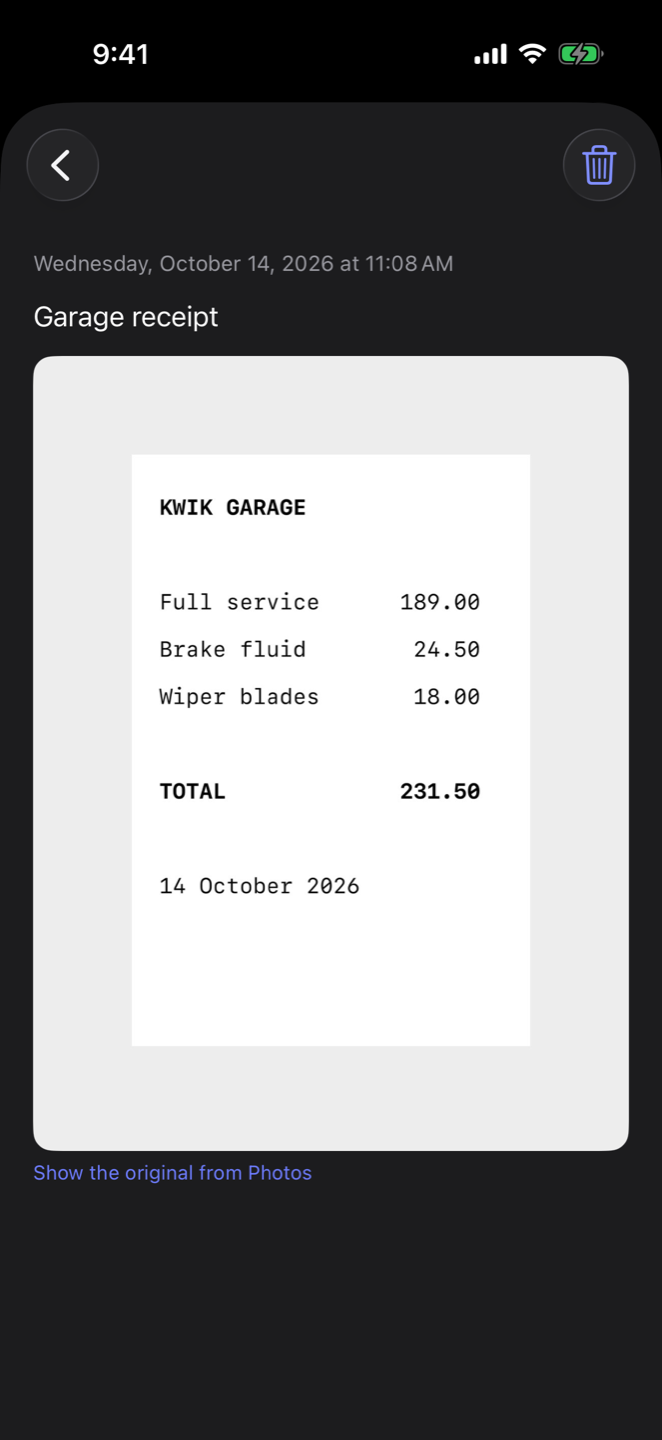
KWIK GARAGEFull service189.00Brake fluid24.50Wiper blades18.00TOTAL231.50

Kept: Garage receipt. Kwik Garage, 231.50.

Mac · 14:40 at your desk

Show me the photo of the receipt I snapped this morning

Here it is: the Kwik Garage receipt, 231.50. Click it to see it large.

KWIK GARAGEFull service189.00Brake fluid24.50Wiper blades18.00TOTAL231.50

Need your passport? Ask for it.

At the check-in desk, at the bank, filling in a form. Ask Pokko to show your passport and it brings it up from your memory, on whichever device is in your hand.

  • Kept private by itself. Pokko recognises a passport, an identity card or a bank card on your device and keeps it private.
  • Shown to you, not sent. What a private item holds is never sent to the AI. You see it; the model only hears its name.
  • On iPhone: it is listed under the answer, one tap to open. On Mac: choose "Just show me" and it opens in the chat.
iPhone · at the airport

Show me my passport

Here is your passport, from your memory.

🔒
PassportPrivate · tap to open. Not sent to the AI.

It remembers your days

Every night, Pokko writes up your day.

So tomorrow it still knows what you were in the middle of, and so do you.

  • A few lines, not a transcript. What you worked on, what you decided, what you left open.
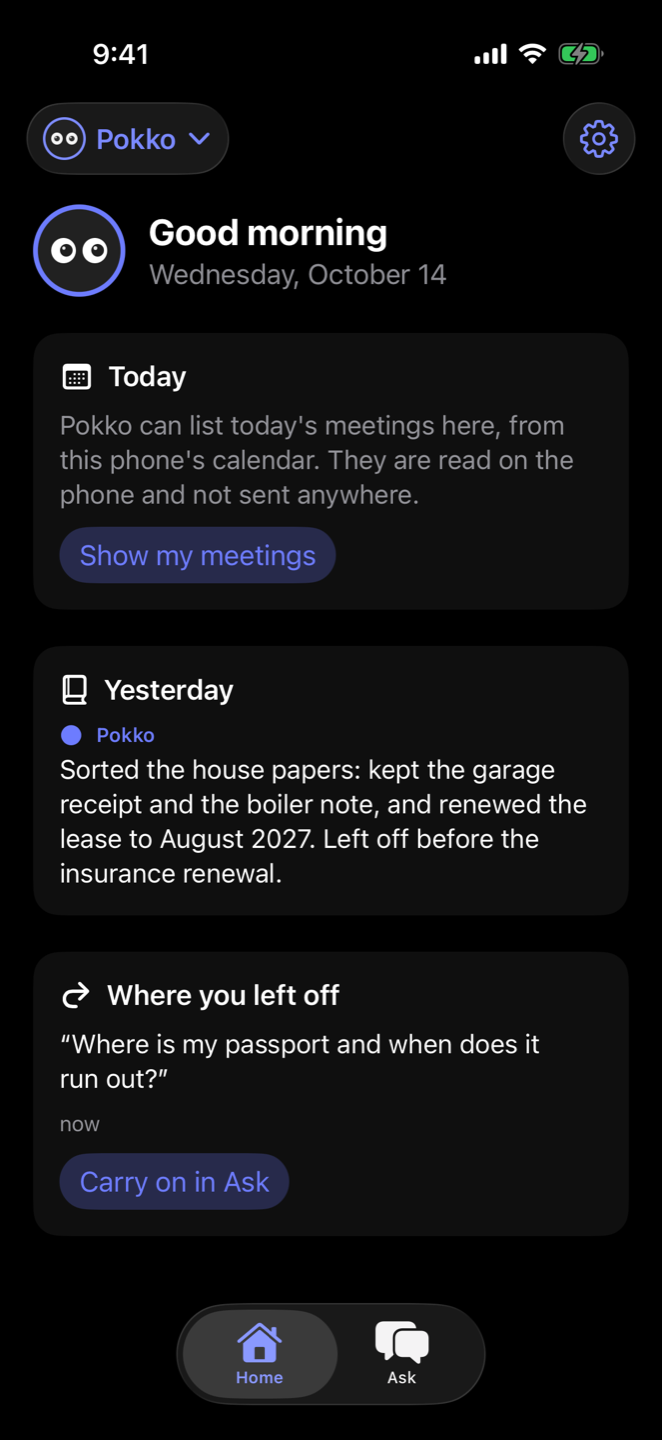
  • Waiting for you in the morning. Yesterday's summary and the question you left off on are on Home when you open the iPhone.
  • Nothing is thrown away. The whole day is kept beside the summary, word for word. Ask "what was I doing last Tuesday?" and it finds the day and the passage.
  • A fresh start, with the past in reach. Each day's chat begins clean. Earlier days are looked up when you ask about them.

A day runs from four in the morning to four in the morning, so a late night belongs to the day before. The summary is written by Pokko on your Mac, from what you said on both devices, and shows on your iPhone once it has synced.

Tuesday, all day

The lease is renewed to August 2027.

Kept. Two months' notice, as before?

Yes. Still need to sort the insurance.

Kept word for word
4 am
Tuesday, in a few lines

Sorted the house papers: kept the garage receipt and the boiler note, and renewed the lease to August 2027. Left open: the insurance renewal.

Written by Pokko
Next morning
Wednesday

Where was I?

Yesterday you sorted the house papers and renewed the lease. You left off before the insurance renewal.

What it is for

Twelve ways it earns its place.

Every one of these works in the apps today.

Mac and iPhone

When does my passport run out?

Photograph a document once. Pokko reads the writing in the picture, so the question finds the scan a year later, with the date.

Mac and iPhone

Show me the photo I took this morning

Snap it on the iPhone, ask for it on the Mac. It is one memory, kept in step through your account.

Mac

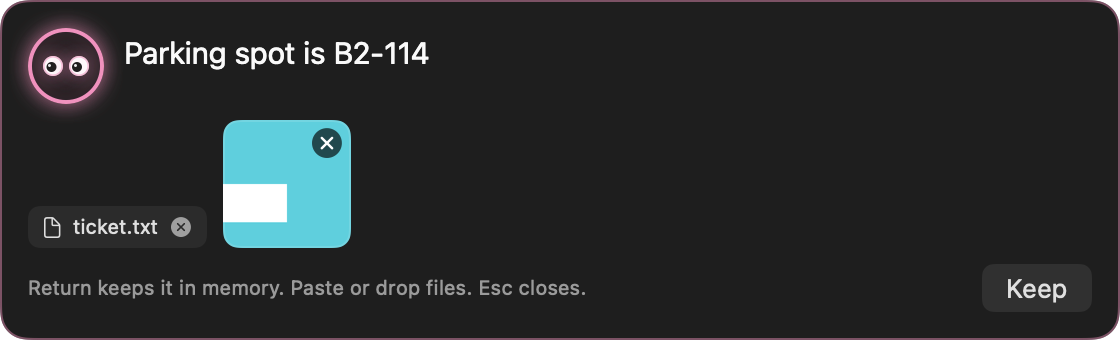
Parking spot is B2-114

Press ⌥⇧Space anywhere on the Mac. A small bar opens over what you are doing; type the thought, press Return, and it is kept. No chat, no waiting.

Mac and iPhone

What was I doing last Tuesday?

Pokko writes up each day in a few lines: what you worked on, what was decided, what was left open. Ask about any day and it finds the entry and the exact passage.

iPhone

Good morning

Home shows yesterday in a few lines, the question you left off on, and today's meetings from the phone's calendar.

Mac and iPhone

What did I say on the other device?

It is one conversation. Ask on the Mac at your desk, carry on from the phone on the train. Each side shows what was said on the other.

iPhone

Keep this receipt

Take a photo of a receipt, a warranty or a boarding pass. Pokko keeps a small copy it can read; the original stays in Photos.

Mac and iPhone

Here is my bank card

A passport, an identity card or a bank card is recognised on your device and kept private. The AI is told its name and nothing more.

Mac and iPhone

Same file twice? Stored once.

Pictures are shrunk to a size that can still be read, and a file you keep twice takes the room of one. A year of everything is small.

iPhone

Send to Pokko

From Safari, Photos, Files or any app: Share, then Pokko. Links, pictures and files go into your memory.

Mac and iPhone

Work is work, home is home

Make a Pokko for each part of your life, each with its own name, colour and memory. One never reads another's.

Mac

Hold a key and talk

Hold ⌥Space, speak, let go. The reply can be read aloud. Listening happens on the Mac.
Pokko for Mac

One shortcut away, all day.

A panel that opens over your work and gets out of the way. Drop a file, paste a picture, type a thought. It is kept, sorted and ready to be asked for.

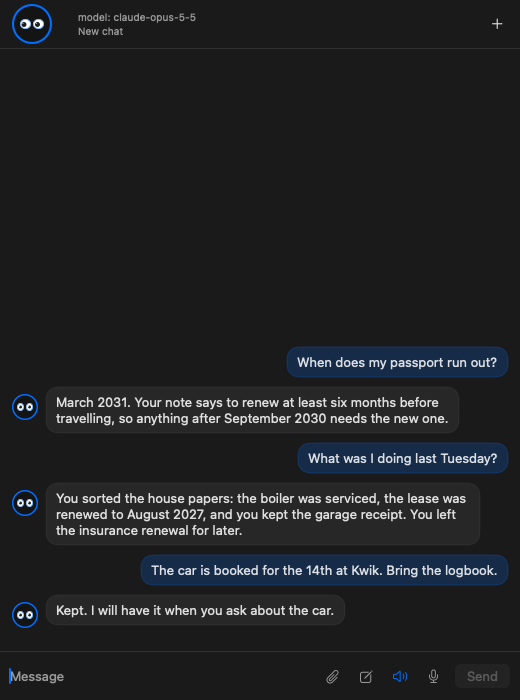
Ask it anything you have told it.

Each message is checked against your memory first, and what matters goes along quietly. You never have to say "do you remember".

  • Remembers unasked. A name, a date, a preference or a plan is kept when you say it.
  • Each day starts fresh. Only today's part of a conversation is sent to the AI. Earlier days are looked up when you ask.
  • Finds by what a picture says. The writing in a photo or scan is read on the Mac, so a question finds the scan.
The chat panel on the Mac

Catch a thought without leaving what you are doing.

⌥⇧Space opens the capture bar over any app. Type, paste or drop a file, press Return. It is in memory, and nothing was sent to an AI.

The capture bar holding a note, a text file and a picture

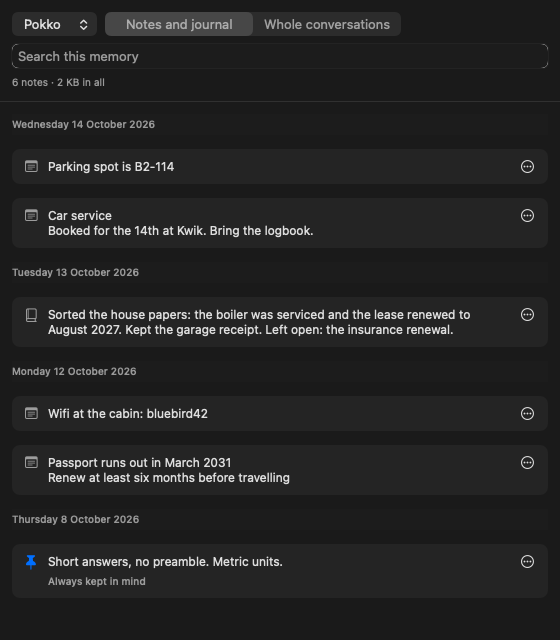
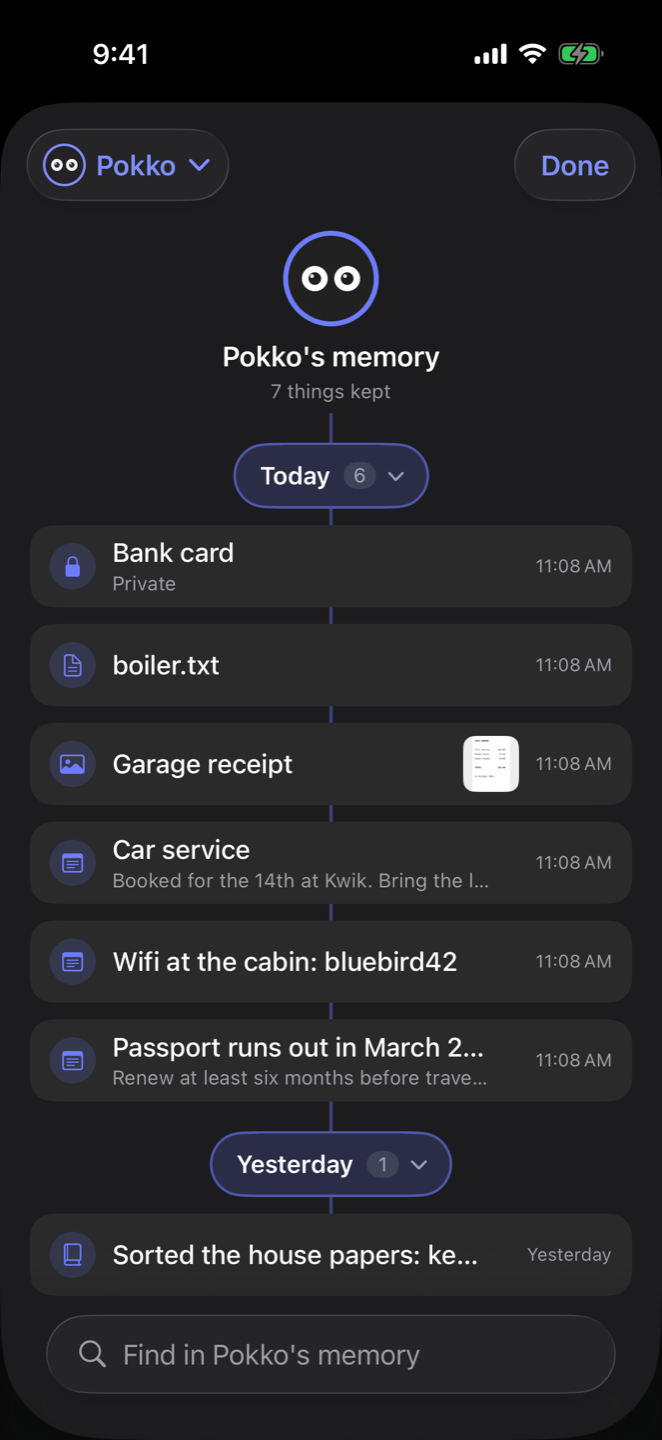
A memory you can open and read.

Everything kept, by day. Notes and journal entries on one side, whole conversations on the other.

  • Search, edit, pin, delete. What you pin is kept in mind in every reply.
  • A journal written for you. One short entry a day, cut at four in the morning so a late night belongs to the day before.
  • Backed up daily. A week of copies on your Mac, so a memory deleted by mistake can be put back.
The memory window on the Mac, with notes under each day

Pokko for iPhone

Snap it. Share it. Say it. It is kept.

The phone is where most things turn up: a receipt in your hand, a link in Safari, a thought on the train. Give each one to Pokko in a second. It is the same memory as your Mac, or all you need if you have no Mac.

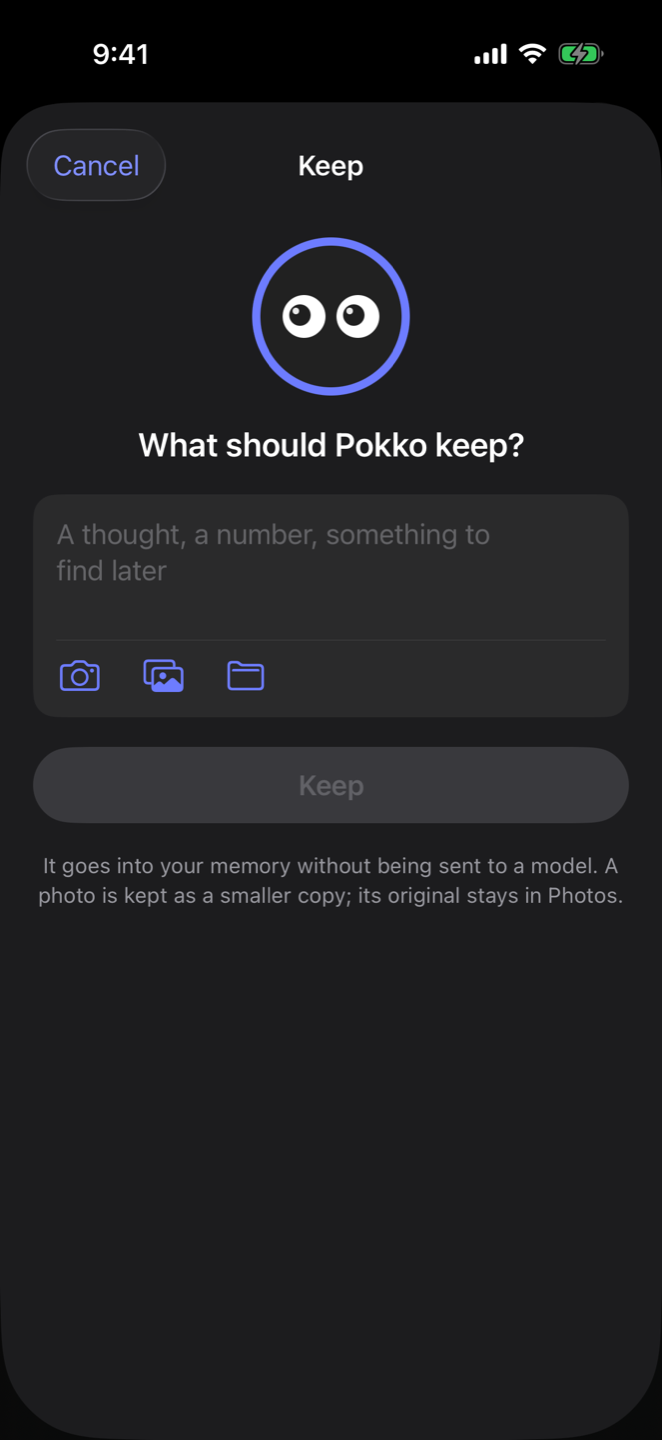
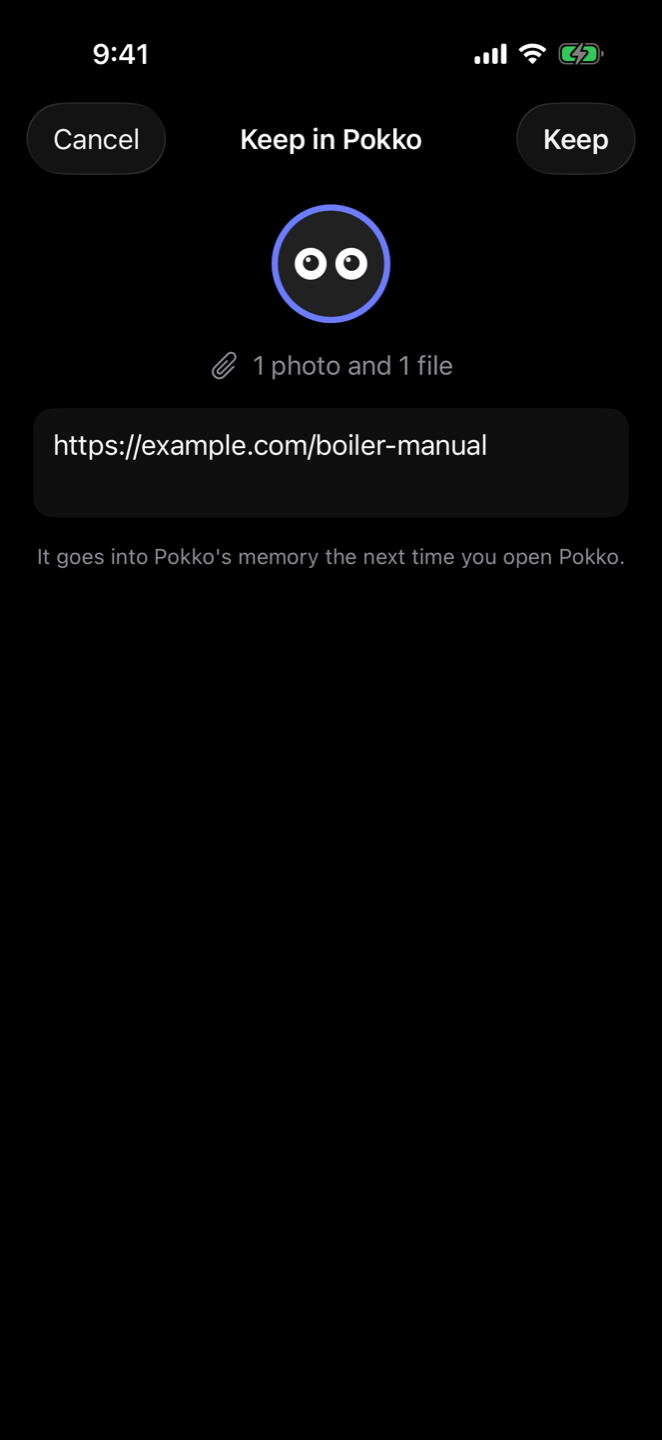
The Keep sheet
Keep anythingA thought, a photo from the camera or library, a file. One press.
The share sheet
From any appShare, then Pokko. Links, pictures and files go in.
Everything kept, by day
Your memory treePokko at the top, a branch for each day, everything you kept hanging from it.
A kept receipt
Photos it can readA small readable copy in Pokko; the original stays in Photos.
The Ask screen
Ask for it backIn your own words. It shows which note it used.
The Home screen
HomeYesterday in a few lines, and where you left off.
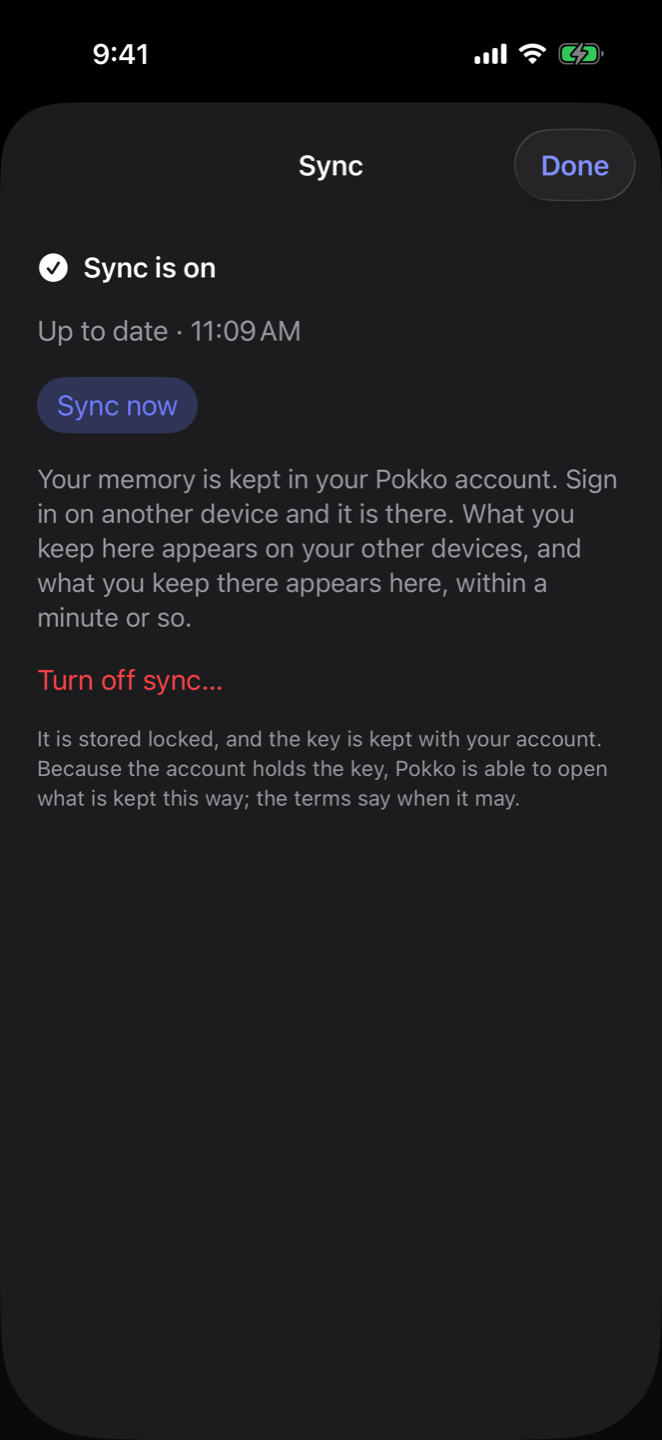
The Sync screen
Everywhere you sign inKept in your account, the same on every device.
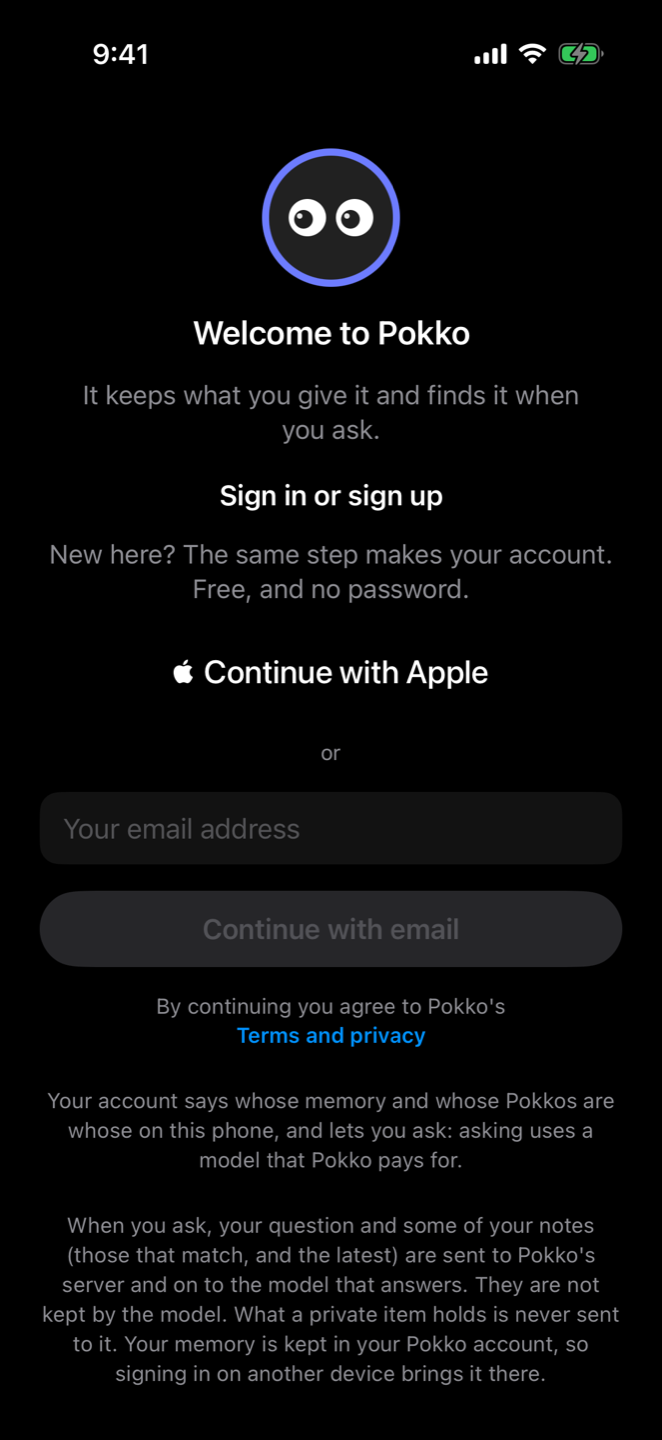
The sign-in screen
No passwordApple, or a code by email.

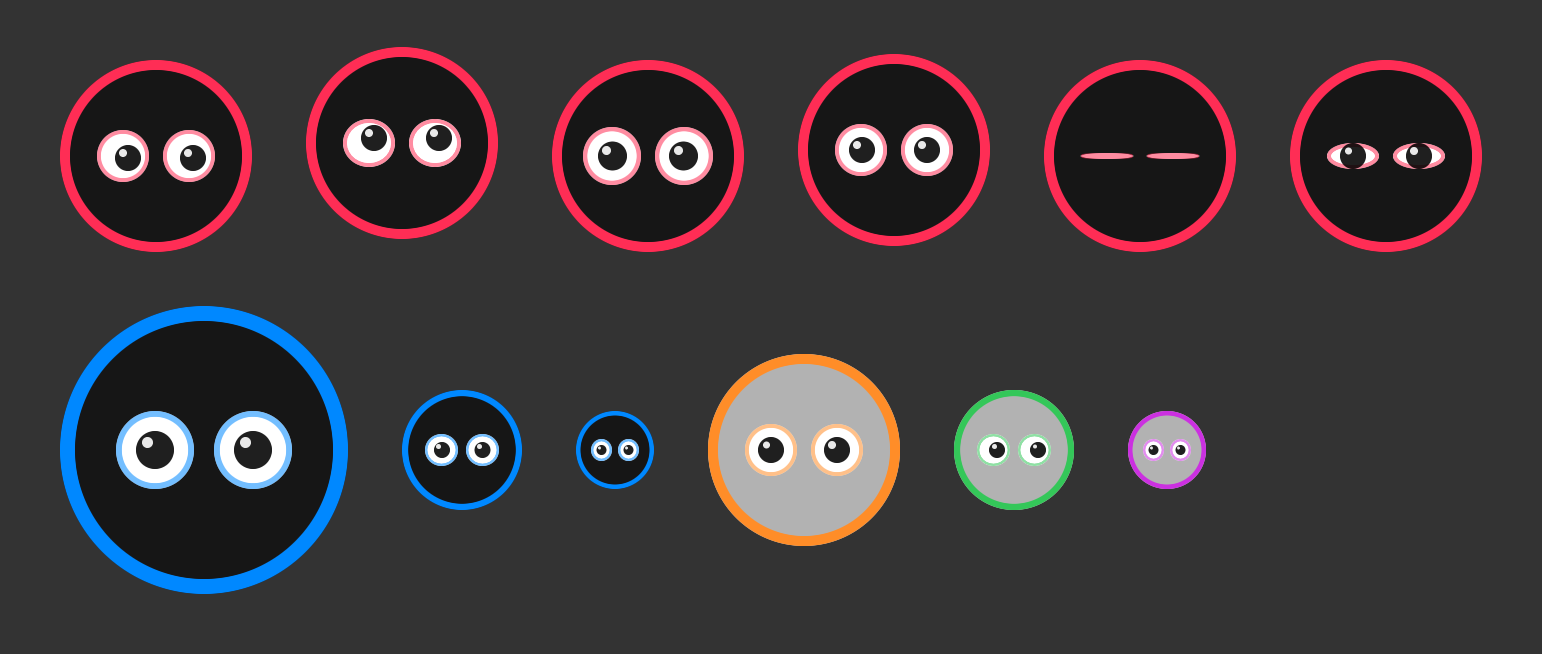
One face

Two eyes in a ring.

They blink and look about, look up while Pokko thinks, go wide while it listens, and move while it speaks. Each Pokko wears them in its own colour.

Pokko's face in several moods, sizes and colours

Privacy, said plainly

Your things. The plain truth about them.

Your memory is in your account. It is on your device and on Pokko's servers, stored encrypted, so that signing in on another device brings it there.

The key is kept with your account. That is what lets a new phone open your memory with only a sign-in. It also means Pokko is able to open it. We do so only to run the service, to help you when you ask, or when the law requires it. We do not sell it, show it to advertisers, or use it to train AI models.

What you delete is deleted. Only what you delete in the app is removed from your account.

When you ask a question, the notes that answer it are sent to an AI service. On the iPhone that is Pokko's server and the model behind it. On the Mac it is the service you chose. Use a model on your own Mac and nothing leaves it.

Private items are never sent. Identity documents and bank cards are recognised by patterns on your device. It catches these well and will miss some; mark those by hand.

Straight into memory. What you drop in the capture bar, the Memory window or the iPhone's Keep goes into memory without being sent to an AI at all.

Where it stands

Almost ready.

Pokko for Mac and Pokko for iPhone both work today and are being tested. Neither can be downloaded yet. This page will say so when that changes.